Embeddable Widgets

Powerful widgets for your own website

Add booking forms and availability search to your existing site with simple code snippets. Bookings, payments, and availability all sync automatically with your Campiamo dashboard.

  • Two lines of code
  • No build step required
  • Works on any site
Powerful widgets for your own website

Choose your widget

Four widgets, one dashboard

Choose the widgets your site needs, or use them all together.

Booking Form

Complete Booking Experience

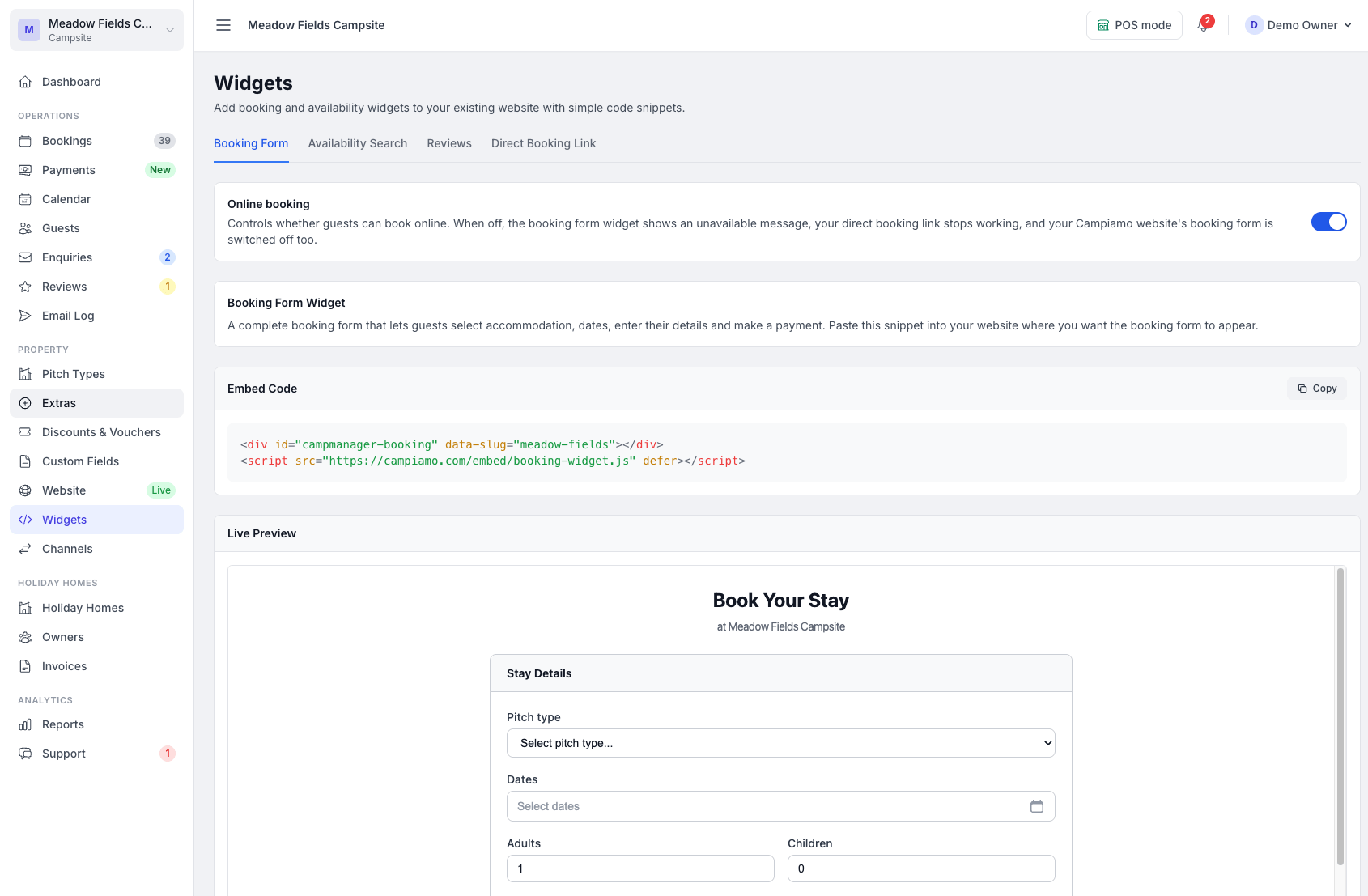
A complete booking form that guests fill out directly on your website. They choose their pitch type, pick dates, enter their details, and pay — all without leaving your site.

  • Accommodation selection with live pricing
  • Date picker with closed dates blocked out
  • Guest details and address capture
  • Deposit or full payment via Stripe/PayPal
  • Seasonal pricing and minimum night rules

Availability Search

Let Guests Browse First

A compact search widget that lets visitors check what's available before they commit. They pick dates, filter by type and guest count, then click "Book Now" on any result.

  • Date search with live availability results
  • Filter by type — pitches, glamping, accommodation
  • Adults and children count with capacity matching
  • Results show pricing, capacity, and availability count
  • "Book Now" links to a hosted booking page with details pre-filled

Reviews widget

Show what your guests say

Your approved guest reviews, pulled live onto any page of your own website, with a button inviting the next guest to leave one. Nothing to switch on: approve a review and it appears.

  • Up to ten approved reviews with star ratings
  • A "Leave a review" button linking to your review form
  • Follows your minimum star rating; low reviews stay out of sight
Growth Plan and up

What’s On

List what’s coming up

Your upcoming events in date order, with names, dates and descriptions, and a "Book your stay" button when you take bookings online. Add or change an event on your calendar and the widget follows.

  • Events drop off automatically once they have finished
  • An "On now" label on anything under way
  • Same colours and font as your other widgets, in your site’s language

Simple setup

How It Works

Three steps to add widgets to your website

  1. 01

    Choose Your Widget

    Pick the booking form, the availability search, the reviews widget or the What’s On list. Each has its own code snippet in your dashboard.

  2. 02

    Paste Into Your Website

    Add the snippet to any page — WordPress, Squarespace, Wix, or plain HTML. It's just two lines of code.

  3. 03

    Guests Search & Book

    Visitors interact with the widget right on your site. Bookings and payments flow straight into your dashboard.

Dead simple

It's Really This Simple

Each widget is just two lines of code

Booking Form

booking-page.html
<div id="campmanager-booking"
data-slug="your-slug"></div>
<script src="...booking-widget.js"
defer></script>

Availability Search

availability-page.html
<div id="campmanager-availability"
data-slug="your-slug"></div>
<script src="...availability-widget.js"
defer></script>

That's it. No build step, no frameworks, no configuration files. Each widget loads independently.

Built for campsites

Why Use Our Widgets?

Everything you need to take bookings, nothing you don't

Keep Your Existing Website

No need to rebuild or migrate. Add bookings to the site you already have, keeping your brand and SEO intact.

No Iframes or Redirects

Widgets render natively on your page using Shadow DOM. Guests never leave your site, so it feels like part of your brand.

Real-Time Availability

Pricing and availability update in real time. Closed dates are blocked out automatically — zero double bookings.

Stripe & PayPal Built In

Collect deposits or full payments at the time of booking. No extra payment plugins needed.

Mobile Responsive

Every widget looks great on phones, tablets and desktops. They adapt to any screen size automatically.

Customisable Branding

Match your brand colours and font. All four widgets share the same appearance settings and blend into your design.

Universal compatibility

Works With Any Website

If you can paste HTML, you can add our widgets

WWordPress
SSquarespace
WWix
</>Custom HTML

Works anywhere you can add a custom HTML block or code snippet — including Webflow, Shopify, GoDaddy, and static sites.

Get started today

Ready to add widgets to your website?

Get set up in minutes. Paste one snippet and start accepting bookings today.

No credit card required. Switching from another system? Migration is free on paid plans.